 RightTab
A calm workspace
for every open tab.
Find your place among open pages. Keep related tabs together, turn them into tasks, and make room for what comes next.
RightTab replaces Chrome’s new tab page with a clear view of your workspace. Open the same view in the side panel to keep it beside the page you are using.
View in Chrome Web Store ↗The Chrome Web Store listing is being prepared. The store button will offer installation after Google approves and publishes the extension.
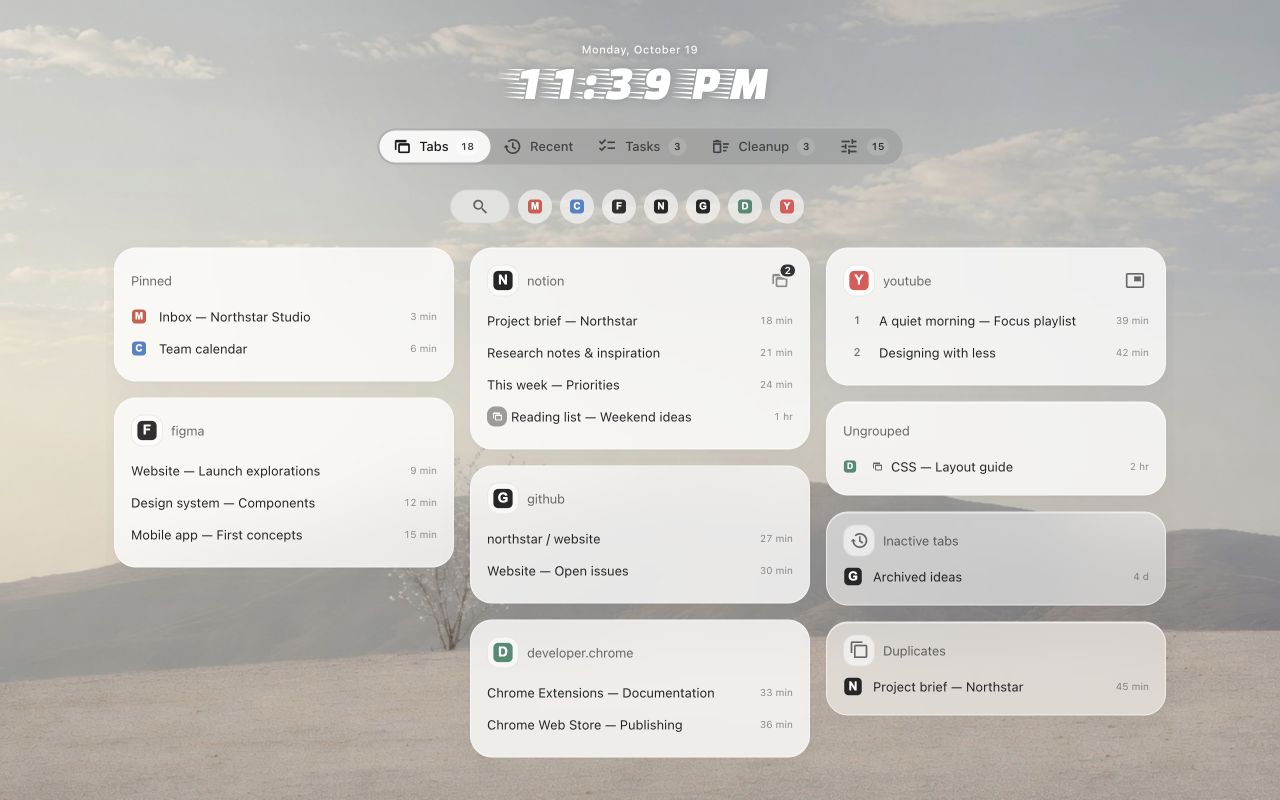
Actual RightTab interface with fictional demonstration data.
See the shape of your work
Browse cards grouped by website. See tabs across Chrome windows, keep pinned pages close, and spot duplicates or pages you have not visited in a while. Native Chrome grouping is optional.
Keep a page for a reason
Save one or more pages in a named task. Snooze a tab so it can return later. Recent visits and a local visited-site catalog help you find your way back.
Clear space when you choose
Review cleanup suggestions, gather a website’s tabs into one window, or merge windows. Media controls and active Google Meet context keep relevant pages within reach; supported controls can require website permission.
Know what your browser shares
RightTab handles tab addresses, titles and activity locally for its workspace features. Settings may sync through Chrome Sync. History import, frequent sites and supported website controls use optional access. Google search suggestions and Unsplash images are optional external services; the clock font loads from jsDelivr. Read the Privacy Policy for the details.
Ten interface languages are included: English, Ukrainian, Russian, French, Simplified Chinese, Spanish, German, Czech, Polish and Brazilian Portuguese.